
Congratulations, you just inherited a website. Maybe you took a new job, picked up a client, or got handed the keys after someone left. There is a thrill in it, and then there is the quiet dread of opening the analytics and finding a tangled mess. Random goals, mystery filters, tracking that may or may not work. Where do you even start?
Here’s the thing. You cannot trust data you have not checked. Before you make a single decision on those numbers, you need to run an analytics audit. It is the only way to know whether the data is solid or quietly lying to you.
Let’s break this down together. This is your step-by-step analytics audit checklist for any site you just inherited, so you can trust your numbers before you act on them.
Why Audit Before You Touch Anything
It is tempting to dive straight into the dashboard and start drawing conclusions. Resist that. Inherited analytics setups are full of surprises that quietly distort everything you see.
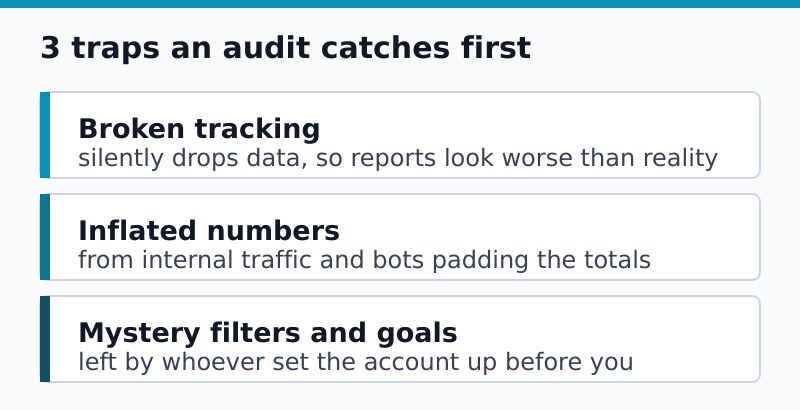
An analytics audit protects you from three classic traps:
- Broken tracking that silently drops data, so your reports look worse than reality.
- Inflated numbers from internal traffic, bots, or double-firing tags.
- Mystery goals nobody can explain, quietly skewing your conversion picture.
Skip the audit and you risk building a whole strategy on a cracked foundation. That said, the audit itself does not have to take days. Work the checklist, and you will know exactly what you are dealing with.
The Complete Analytics Audit Checklist
Here is the quick version. Print it, save it, work through it top to bottom. We will break down each item right after.
- Confirm you have full access and ownership
- Verify the tracking code is installed and firing
- Check for duplicate or missing tracking
- Review filters and internal traffic exclusion
- Audit goals and conversion events
- Inspect data retention and historical depth
- Cross-check numbers against a second source
- Document everything you find
Step 1: Confirm Access and Ownership
First things first. Do you actually have admin access, or just a view-only seat someone shared once? You want full control so you can fix problems, not just stare at them.
While you are there, check who else has access. Old agencies, former employees, and forgotten contractors often linger in the user list. Clean house early.
Step 2: Verify the Tracking Code Is Firing
Next, confirm the tracking actually works. A surprising number of inherited sites have tracking that broke during a redesign and nobody noticed. Open the live site, trigger a visit, and watch the real-time report. If your visit shows up, the basics are alive.
Then spot-check a few key pages. Tracking sometimes lives on the homepage but vanishes on the checkout or contact page, which is exactly where you need it most.
Step 3: Hunt for Duplicate or Missing Tracking
Here is a sneaky one. Sometimes a site fires the same tracking twice, once from the theme and once from a plugin. That doubles your numbers and ruins metrics like bounce rate. Use your browser tools or a tag inspector to count how many times tracking fires per page.
If a page reports a near-zero bounce rate that seems too good to be true, double-firing is a prime suspect. Our guide on diagnosing bounce rate problems walks through how to tell a real number from a broken one.
Step 4: Review Filters and Internal Traffic
Filters shape what your data even includes. An inherited account might exclude an old office IP that no longer exists, or fail to exclude the current team entirely. Either way, your numbers drift from reality.
Check for these common issues:
- Internal team traffic counted as real visitors
- Outdated IP filters that block nothing useful
- Overly aggressive filters quietly removing real visitors
- Missing bot and spam exclusion
Step 5: Audit Goals and Conversion Events
Now the fun part: mystery goals. Inherited accounts love to have conversion events nobody can explain. A goal named “Goal 3” firing on every page view is worse than no goal at all, because it makes your data look healthier than it is.
Go through every conversion event and ask three questions:
- What action does it actually represent?
- Does it still match a real business goal?
- Is it firing correctly, not too often or not at all?
Anything you cannot justify is a candidate for cleanup. This is also a good moment to revisit your measurement plan and make sure the goals map to outcomes that matter.
Step 6: Check Data Retention and History
How far back does the data go, and how long will it stick around? Some accounts quietly delete older data after a set window. If the history matters to you, note the retention setting and consider exporting older data before it disappears.
This is especially important if you ever plan to switch tools, since you will want that history preserved. A separate export step protects you from losing years of context overnight.
Step 7: Cross-Check Against a Second Source
Never trust a single number in isolation. Compare your analytics traffic against another source, like search console data or server logs. If they roughly agree, your tracking is probably healthy. If they wildly disagree, something is broken.
Keep in mind that no two sources match exactly. They count differently, so expect a gap. A modest difference is normal. A huge one is a red flag worth chasing down.
Step 8: Document What You Found
Finally, write it down. An audit you keep in your head is useless next month. Create a simple document that records the setup, the problems you found, and the fixes you applied.
Your audit notes become a baseline. Six months from now, when something looks weird, you will have a record of what “normal” looked like the day you took over.
Common Mistakes to Avoid
- Trusting the data on day one. Always assume an inherited setup has issues until you prove otherwise.
- Changing settings before documenting them. Record the original state first, so you can undo a change that backfires.
- Ignoring access cleanup. Stale users are a privacy and security risk, not just clutter.
- Auditing once and forgetting. A quick re-check every few months keeps surprises small.
Bottom Line
Inheriting a site means inheriting its analytics baggage too. An analytics audit is how you separate trustworthy numbers from quiet lies before they steer your decisions wrong.
No fluff, just straight answers. Keep these takeaways close:
- Verify before you trust. Confirm tracking fires and access is clean.
- Hunt for distortions like duplicate tracking, bad filters, and mystery goals.
- Cross-check your numbers against a second source for a sanity test.
- Document everything so today’s audit becomes tomorrow’s baseline.
Spend a focused session on this checklist before you act on any inherited data. You will save yourself weeks of chasing phantom problems, and you will lead with confidence instead of guesswork.

Leon Bauer
Explorer of web analytics and digital measurement tools. I dive deep into features, limitations, and use cases of platforms like Google Analytics, Matomo, Plausible, and others. My mission is to demystify analytics through honest reviews and practical guides.
More about me →