Self-Hosted vs Cloud Analytics: Pros, Cons, and Hidden Costs
 Leon Bauer
·
·
·
9 min read
Leon Bauer
·
·
·
9 min read
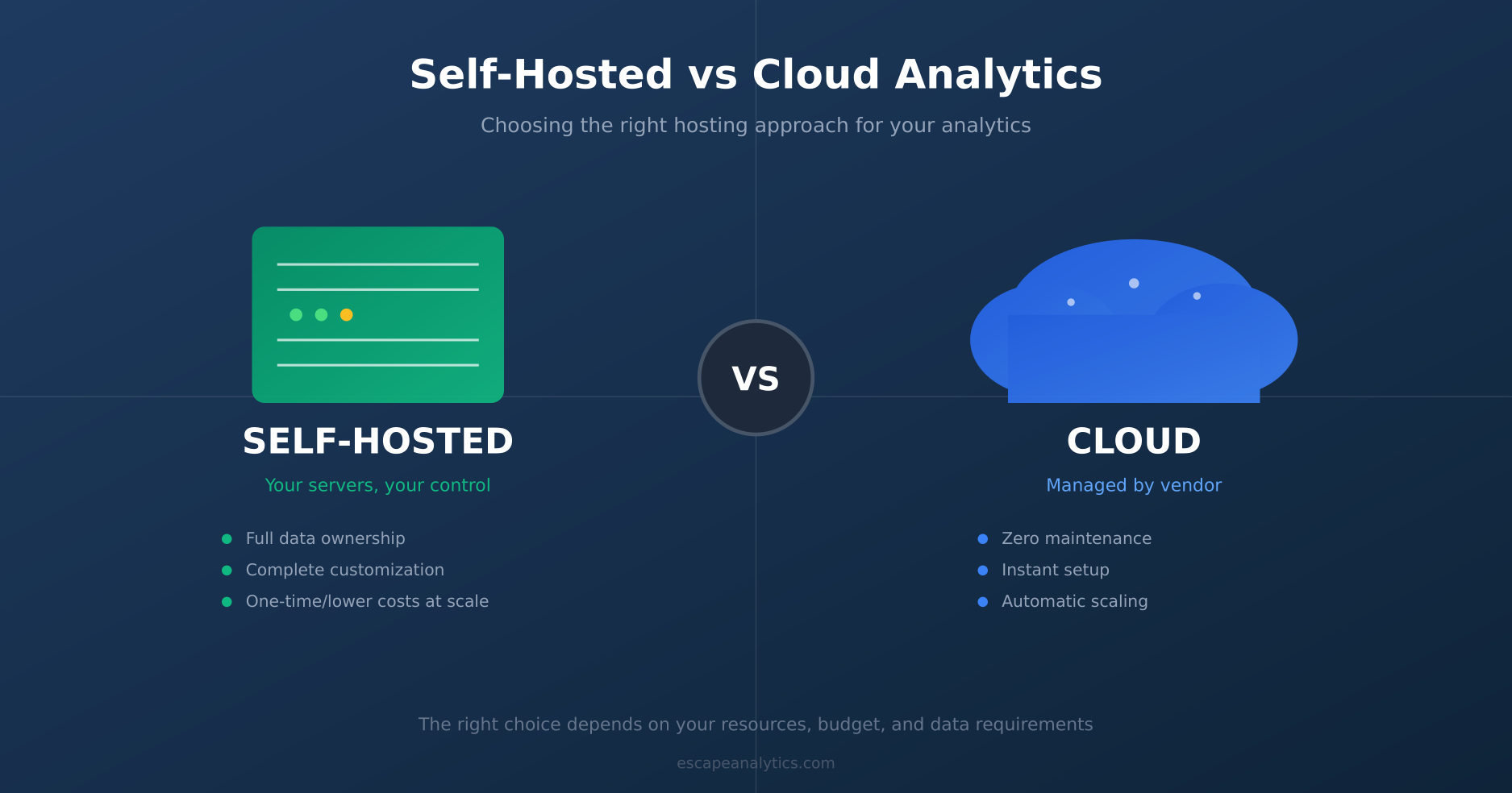
You’re ready to set up analytics for your website. You’ve done your research, narrowed down your options, and then hit an unexpected fork in the road: should you host the analytics yourself, or use a cloud-based service?
It seems like a simple infrastructure question. But this decision affects everything—your budget, your team’s workload, data ownership, compliance posture, and even the insights you’ll be able to extract. Get it wrong, and you might find yourself migrating platforms a year later, losing historical data in the process.
Let’s break down the real differences between self-hosted and cloud analytics, including the costs nobody talks about upfront.
The Quick Answer
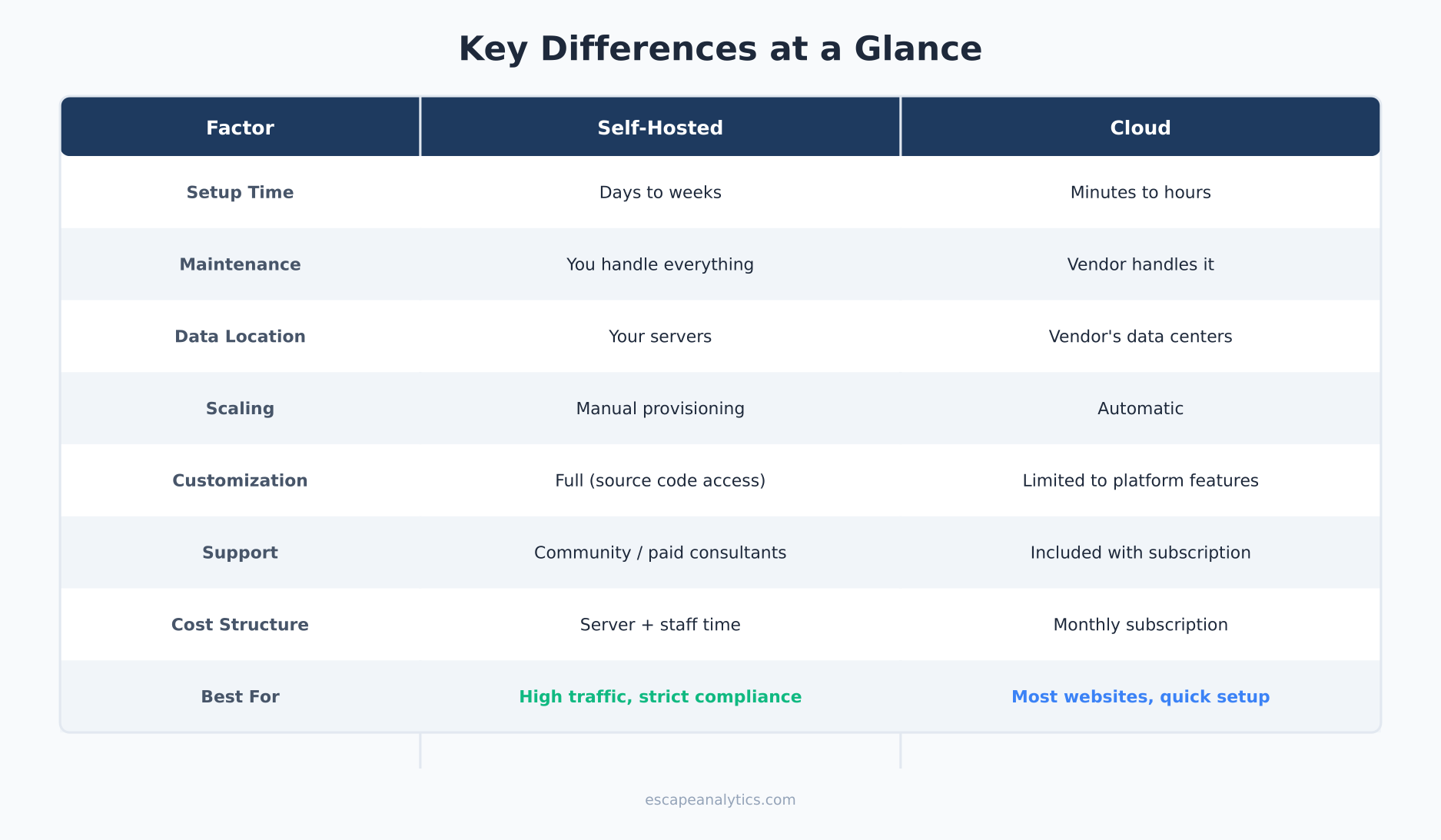
Cloud analytics means the vendor hosts everything—servers, databases, updates, security. You just add a tracking script and log in to see your data. Think of it as renting an apartment: move in, pay monthly, someone else handles maintenance.
Self-hosted analytics means you run the software on your own servers (or a VPS you control). You’re responsible for installation, updates, backups, and security. It’s like owning a house: more control, more responsibility.
Neither option is universally better. The right choice depends on your technical resources, budget structure, data sensitivity, and growth plans.
Cloud Analytics: The Managed Approach
Cloud-based analytics platforms handle everything on their infrastructure. You sign up, add a snippet to your site, and start collecting data immediately. No servers to provision, no databases to maintain.
Typical examples are Plausible, Fathom and Statable — hosted services where you pay monthly and never touch a server. All three can import aggregated Google Analytics 4 reports, so you can bring your history with you instead of starting from zero. We compare them side by side in our privacy-first platforms comparison.
Advantages of Cloud Analytics
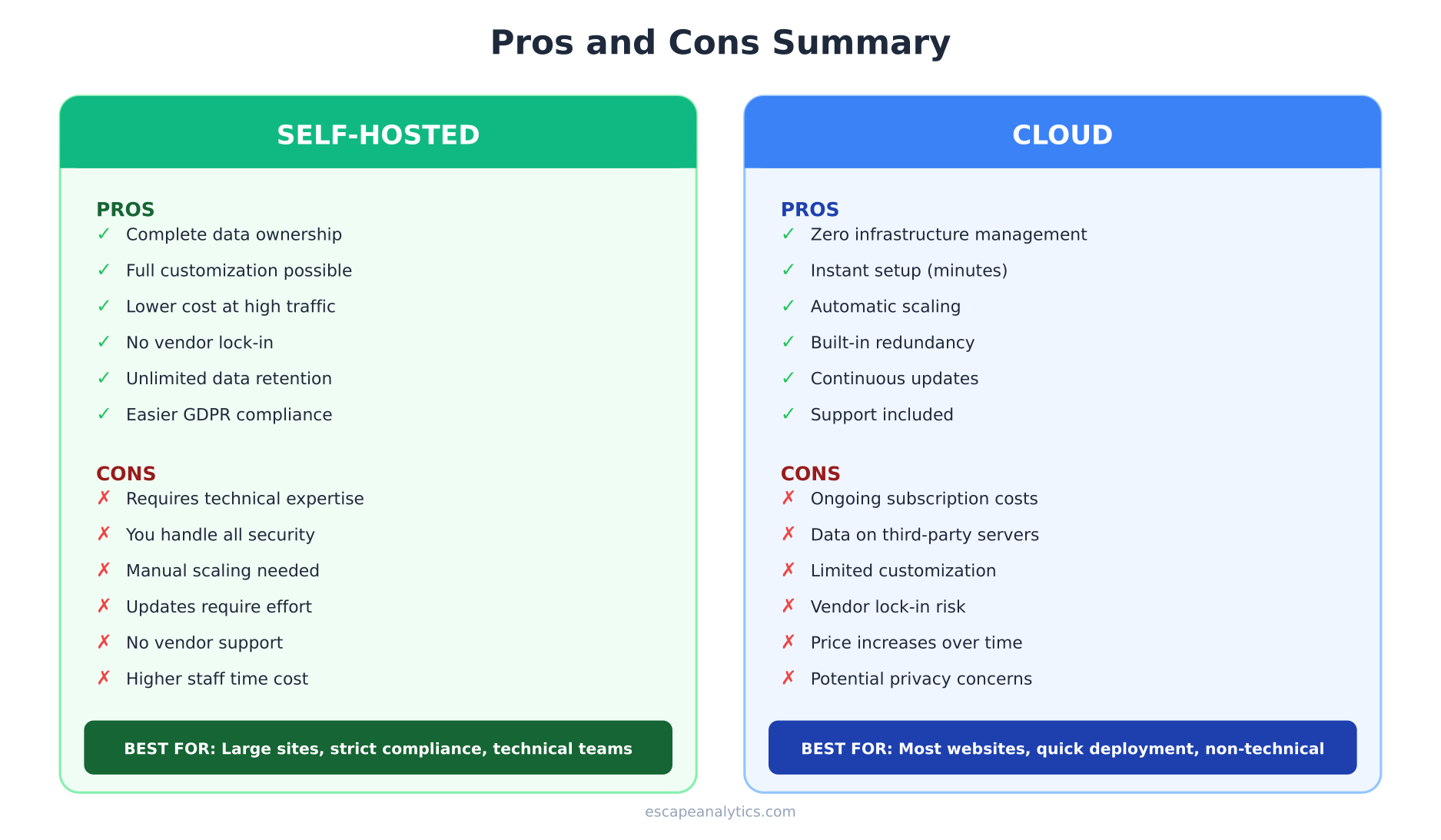
- Zero infrastructure management — No servers, no updates, no security patches. The vendor handles it all.
- Instant setup — Most platforms take 5-10 minutes to get running. Add script, verify, done.
- Automatic scaling — Traffic spike during a product launch? The platform scales automatically.
- Built-in redundancy — Enterprise-grade uptime, backups, and disaster recovery included.
- Continuous improvements — New features roll out automatically without any effort from you.
- Support included — Someone to call when things don’t work as expected.
Disadvantages of Cloud Analytics
- Ongoing subscription costs — Monthly or annual fees that increase as your traffic grows.
- Data lives on someone else’s servers — You’re trusting a third party with potentially sensitive information.
- Less customization — You get what the platform offers; deep modifications aren’t possible.
- Vendor lock-in — Migrating away means losing historical data or complex export processes.
- Privacy concerns — Some cloud platforms share data with advertisers or use it for their own purposes.
Self-Hosted Analytics: The DIY Approach
Self-hosted analytics means running open-source or licensed software on infrastructure you control. This could be your own physical servers, a cloud VPS, or a container in your existing cluster.
Advantages of Self-Hosted Analytics
- Complete data ownership — Your data never leaves servers you control. Period.
- One-time or lower costs — No per-pageview pricing. Pay for server resources, not data volume.
- Full customization — Modify the source code, add custom reports, integrate with internal systems.
- Privacy compliance — Easier to meet strict requirements when data doesn’t cross borders.
- No vendor dependency — The platform can’t sunset features you rely on or raise prices unexpectedly.
- Unlimited data retention — Keep data forever without hitting plan limits or paying for extended storage.
Disadvantages of Self-Hosted Analytics
- Requires technical expertise — Someone needs to install, configure, and maintain the system.
- You handle security — Patches, firewalls, intrusion detection—all your responsibility.
- Scaling is manual — Traffic spike? Hope you provisioned enough capacity.
- Updates require effort — New versions don’t install themselves. Testing and migration needed.
- No support safety net — When something breaks at 3 AM, you’re on your own (or relying on community forums).
The Hidden Costs Nobody Mentions
Here’s where the comparison gets interesting. The sticker price of either option tells only part of the story.
Hidden Costs of Cloud Analytics
- Overage charges — Exceed your pageview limit and costs can spike dramatically. Some platforms charge 2-3x the base rate for overages.
- Feature tiers — That report you need? Only available on the enterprise plan. API access? Extra cost.
- Data export fees — Some platforms charge to export your own data, or make it technically difficult.
- Integration costs — Connecting to your CRM or data warehouse might require a premium plan.
- Price increases — SaaS pricing rarely goes down. Budget for 10-20% annual increases.
Hidden Costs of Self-Hosted Analytics
- Staff time — The biggest hidden cost. Installation, maintenance, troubleshooting, updates. Even “free” software costs engineer hours.
- Server resources — Database storage, CPU for processing, bandwidth for tracking requests. These scale with traffic.
- Security audits — If you’re handling sensitive data, you’ll need periodic security reviews.
- Backup infrastructure — Redundant storage, offsite backups, disaster recovery planning.
- Opportunity cost — Hours spent maintaining analytics are hours not spent on your core product.
- Learning curve — Training team members on a less common platform takes time.
Total Cost of Ownership: A Real Comparison
Let’s model actual costs for a mid-sized website with 500,000 monthly pageviews.
Cloud Analytics Scenario
| Cost Item | Monthly | Annual |
|---|---|---|
| Platform subscription | $50-150 | $600-1,800 |
| Occasional overages | $20 | $240 |
| Premium features (if needed) | $50 | $600 |
| Staff time (minimal) | 2 hours × $50 | $1,200 |
| Total | $170-320 | $2,640-3,840 |
Self-Hosted Analytics Scenario
| Cost Item | Monthly | Annual |
|---|---|---|
| VPS/Server | $40-80 | $480-960 |
| Database storage | $20 | $240 |
| Backups | $10 | $120 |
| Staff time (significant) | 8 hours × $50 | $4,800 |
| Initial setup (amortized) | $50 | $600 |
| Total | $220-310 | $6,240-6,720 |
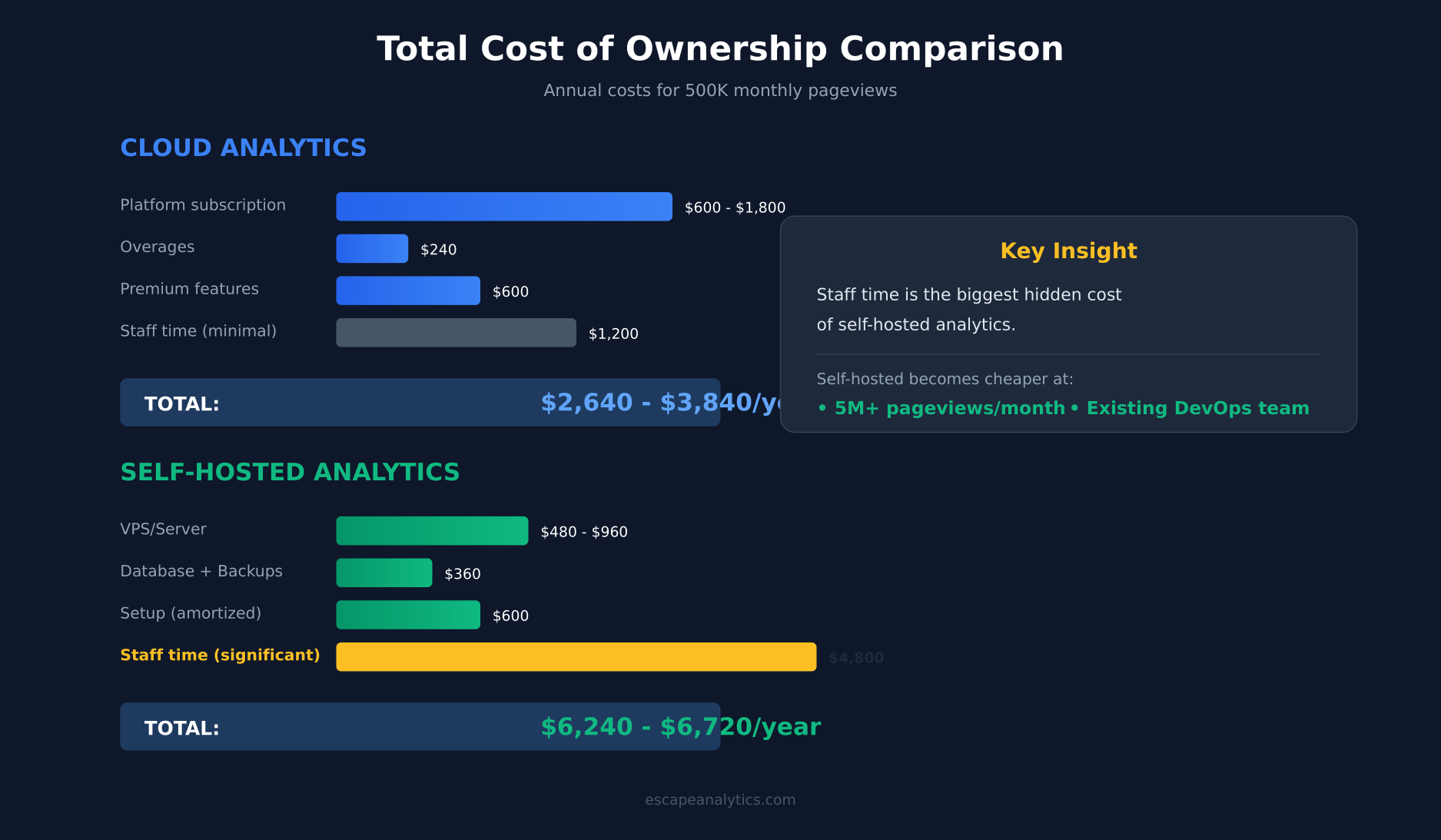
Wait—self-hosted is more expensive? Often, yes. The “free” software costs more in labor than paid alternatives. However, the equation shifts dramatically in two scenarios:
- High traffic volumes — At 10M+ pageviews, cloud pricing skyrockets while server costs grow modestly.
- Existing infrastructure — If you already have DevOps staff and servers, marginal cost of self-hosting drops significantly.
Data Ownership and Privacy Implications
Beyond cost, data control is often the deciding factor—especially post-GDPR compliance.
With cloud analytics, your data typically lives in the vendor’s data centers, often in the US. This creates potential issues:
- Data transfers outside EU may require additional legal safeguards
- Some vendors use your data to improve their products or advertising
- Subpoenas or government requests go to the vendor, not you
- If the vendor is acquired or shut down, your data’s fate is uncertain
With self-hosted analytics, you control the entire data lifecycle:
- Choose where servers are physically located (EU, specific countries, etc.)
- Implement your own data retention and deletion policies
- No third-party access without your explicit involvement
- Full audit trail of who accessed what data
For industries like healthcare, finance, or government, self-hosted may be the only compliant option. For a typical marketing website, cloud is usually fine with proper DPA agreements.
When to Choose Cloud Analytics
Cloud analytics makes sense when:
- You lack technical resources — No DevOps team or sysadmin expertise in-house.
- Speed matters — You need analytics running today, not next month.
- Traffic is unpredictable — Viral content or seasonal spikes would overwhelm fixed infrastructure.
- Budget is predictable — Monthly subscription is easier to justify than upfront server costs.
- You want support — Someone to call when implementation questions arise.
- Data sensitivity is moderate — Standard website analytics, not medical records or financial data.
When to Choose Self-Hosted Analytics
Self-hosted analytics makes sense when:
- Data sovereignty is critical — Legal or policy requirements mandate data stays on your infrastructure.
- You have high traffic — Above 5-10M pageviews/month, self-hosted becomes cost-effective.
- DevOps capacity exists — Team already manages servers; adding analytics is incremental.
- Deep customization needed — You need to modify tracking logic or reporting extensively.
- Long-term cost optimization — Willing to invest setup time for lower ongoing costs.
- Vendor independence — Strategic priority to avoid lock-in to any single platform.
The Hybrid Approach
Increasingly, teams are adopting hybrid strategies:
- Cloud for real-time, self-hosted for archive — Use cloud analytics for daily operations, pipe data to self-hosted storage for long-term analysis.
- Managed self-hosted — Some vendors offer to host open-source analytics on your behalf—middle ground between DIY and full SaaS.
- Cloud analytics + self-hosted data warehouse — Let the analytics platform collect data, but maintain your own copy for advanced analysis.
These approaches capture benefits of both worlds, though they add complexity.
Migration Considerations
Whichever direction you choose, consider the exit strategy:
Migrating from cloud to self-hosted:
- Can you export historical data? In what format?
- Will tracking codes need to change?
- How long will parallel tracking run during transition?
Migrating from self-hosted to cloud:
- Does the cloud platform accept data imports?
- What happens to custom reports and integrations?
- How will you decommission old infrastructure?
The best time to think about migration is before you choose—not two years later when you’re locked in.
Decision Framework
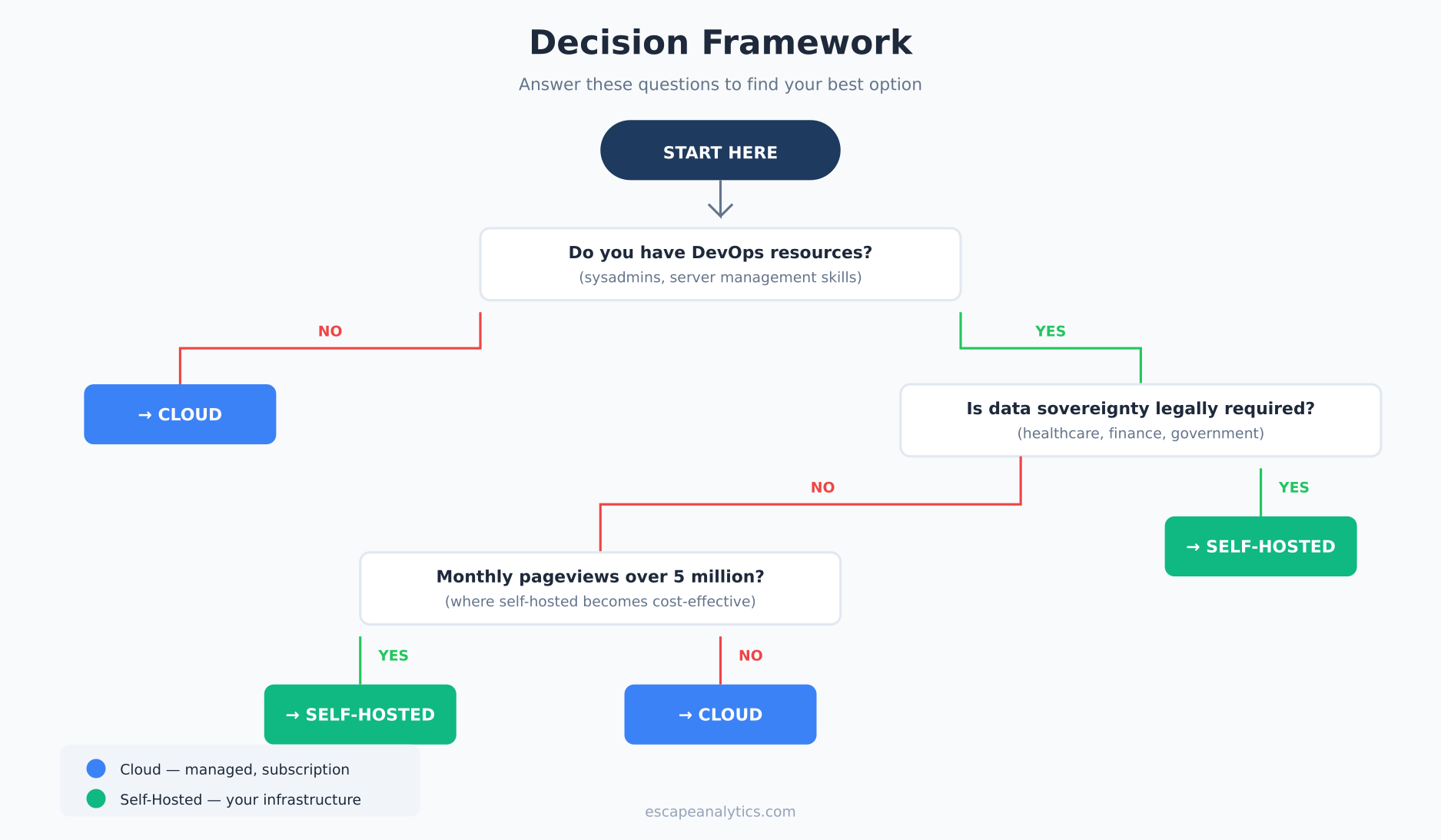
Use this quick framework to guide your decision:
- Do you have DevOps resources? No → Cloud. Yes → Continue.
- Is data sovereignty legally required? Yes → Self-hosted. No → Continue.
- Monthly pageviews over 5 million? Yes → Self-hosted likely cheaper. No → Continue.
- Need deep customization? Yes → Self-hosted. No → Continue.
- Is predictable budgeting important? Yes → Cloud. No → Either works.
Most small to medium websites land on cloud analytics. Most large enterprises with technical teams land on self-hosted or hybrid. Neither is wrong—it’s about matching the solution to your constraints.
Further Reading
Related articles on Escape Analytics:
External resources:
Frequently Asked Questions
Is self-hosted analytics really free?
The software might be free (open-source), but running it isn’t. You’ll pay for servers, storage, bandwidth, and most importantly—staff time. For small sites, “free” self-hosted often costs more than paid cloud.
Can I switch later if I choose wrong?
Yes, but it’s painful. You’ll likely lose historical data continuity, need to update tracking codes, and retrain your team. Better to choose thoughtfully upfront.
Does self-hosted mean on-premise?
Not necessarily. Self-hosted means you control the infrastructure—that could be physical servers in your office, a cloud VPS, or containers in AWS/GCP. You’re responsible for it, but it doesn’t have to be physically on your premises.
Are there security differences?
Cloud platforms typically have dedicated security teams and enterprise-grade protection. Self-hosted security depends entirely on your implementation. For most organizations, cloud is actually more secure—unless you have specialized security expertise in-house.
What about GDPR compliance?
Both can be GDPR-compliant. Cloud requires proper DPA agreements and potentially EU-based data centers. Self-hosted gives you full control but you’re responsible for implementing compliant practices. Self-hosted in EU data centers is often the simplest path to compliance for sensitive data.
Bottom Line
The self-hosted vs cloud analytics decision isn’t about which is “better”—it’s about which fits your situation. Cloud analytics wins on convenience, speed, and support. Self-hosted wins on control, customization, and cost-at-scale.
For most websites, especially those without dedicated DevOps resources, cloud analytics is the pragmatic choice. The subscription cost is real but predictable, and you’re buying expertise along with software.
For organizations with technical teams, high traffic volumes, or strict data requirements, self-hosted delivers value that cloud can’t match—but only if you’re prepared for the ongoing maintenance commitment.
Whichever you choose, make the decision consciously. Understand the true total cost of ownership, not just the sticker price. And always have an exit strategy.

Leon Bauer
Explorer of web analytics and digital measurement tools. I dive deep into features, limitations, and use cases of platforms like Google Analytics, Matomo, Plausible, and others. My mission is to demystify analytics through honest reviews and practical guides.
More about me →